
Screen Time and Dry Eyes: How Are They Related?

Screen Time and Dry Eyes: How Are They Related?

Screen Time and Dry Eyes: How Are They Related?

Screen Time and Dry Eyes: How Are They Related?

Screen Time and Dry Eyes: How Are They Related?

Screen Time and Dry Eyes: How Are They Related?

What Causes Dry Eyes in the Digital Age
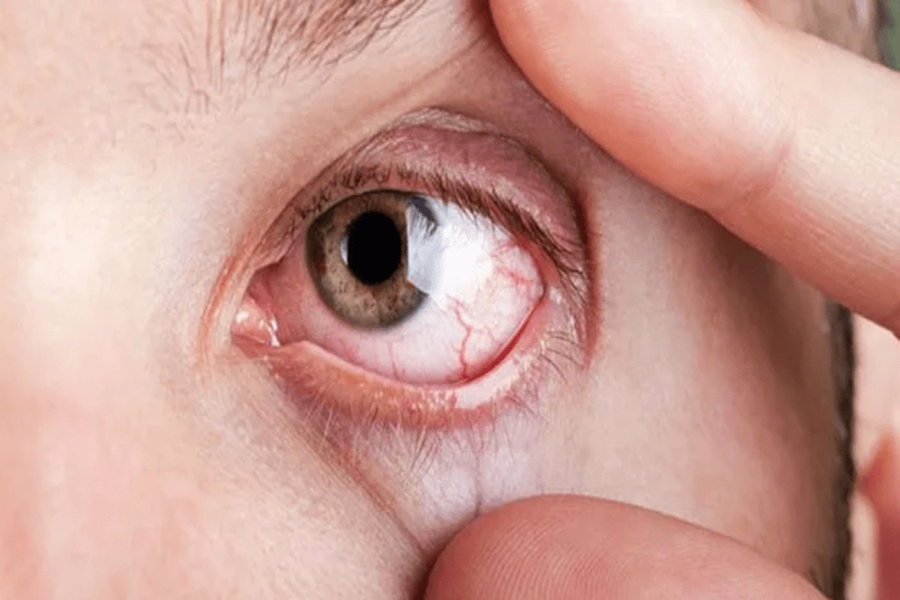
Dry eye syndrome has become increasingly common in today’s digital age, largely due to our heavy reliance on screens for work, learning, and entertainment. This condition occurs when there is insufficient tear production or when the quality of tears is inadequate to keep the eyes lubricated. Let’s explore some of the key contributors to dry eyes in this modern era.
Prolonged Screen Time
Extended hours spent staring at digital devices significantly contribute to dry eyes. When using computers, tablets, or smartphones, people tend to blink less frequently—up to 50% less than normal. Reduced blinking disrupts the natural tear film on the surface of the eye and leads to faster evaporation of tears.
Environmental Factors
Modern environments, such as air-conditioned offices or rooms with low humidity levels, can exacerbate dryness by speeding up tear evaporation. Additionally, exposure to blue light emitted from digital screens may irritate the eyes over time.
Poor Ergonomics
Improper workstation setups can also play a role in dry eyes. Screens positioned too high or too close may cause users to open their eyes wider than necessary, accelerating tear evaporation and increasing discomfort.
Contact Lens Wear
Contact lens users often experience more severe symptoms of dry eyes during prolonged screen usage because lenses can absorb moisture and further strain the eye's surface.
Aging and Other Health Conditions
While aging naturally reduces tear production (especially for individuals over 50), conditions such as diabetes or autoimmune diseases like Sjögren’s syndrome can also influence eye health. These factors combined with lengthy periods of screen exposure often intensify dry eye symptoms.
A Summary Table: Contributing Factors for Dry Eyes
Category | Examples |
Behavioral | Prolonged screen use, reduced blinking |
Environmental | Air conditioning, low humidity |
Health-Related | Aging, underlying medical conditions |
Lifestyle Choices | Contact lens misuse, poor workstation ergonomics |
Dry eyes have become a widespread concern given how integral technology is in our daily lives. Recognizing these causes and taking proactive measures can help maintain optimal eye health despite modern challenges related to digital device usage.
How Screen Time Affects Eye Moisture and Blinking
In our increasingly digital world, many people spend the majority of their day looking at screens. Whether it's a smartphone, tablet, computer, or television, prolonged screen use can have a significant impact on eye health. One of the most notable effects is its influence on eye moisture and blinking patterns.
Reduced Blink Rate
When focusing on a screen for an extended period, the natural blink rate tends to decrease. Normally, humans blink about 15–20 times per minute. However, studies suggest that when using digital devices, this rate can drop by as much as 50%.
Blinking is essential because it spreads a fresh layer of tears across the surface of the eye. This tear film keeps the eyes moist and protects them from dryness and irritation. A reduced blink rate means that this protective mechanism is compromised, leading to dry eyes.
Incomplete Blinks
Another effect of screen time is incomplete blinking. Instead of fully closing the eyelids during each blink, people may perform partial blinks while looking at digital devices. This incomplete action prevents the proper distribution of tears over the entire surface of the eye, contributing further to dryness and discomfort.
Impact on Tear Film Stability
The tear film is a delicate layer made up of water, oils, and mucus that protects and nourishes the eyes. Prolonged screen use can disrupt this layer in several ways:
- Evaporation: Reduced blinking allows tears to evaporate more quickly than usual. - Poor quality tears: Staring at screens for long periods may lead to changes in tear composition over time. - Meibomian gland dysfunction: These glands in your eyelids produce oils that prevent tear evaporation; prolonged strain from screens may compromise their function.
Environmental Factors Related to Screen Use
Screen time often takes place indoors where environmental conditions can exacerbate dry eyes:
- Air conditioning or heating systems can lower humidity levels. - Poor lighting setups may force users to strain their eyes even more. - The distance between screens and users’ faces (too close or too far) can also contribute to discomfort.
Tips for Minimizing Screen-Induced Dryness
To limit dryness caused by screen time:
- Follow the 20-20-20 rule: Every 20 minutes, look at something 20 feet away for at least 20 seconds. - Ensure proper lighting in your workspace; avoid glare on your screens. - Position monitors slightly below eye level to reduce exposure of your ocular surface to air. - Use artificial tears if recommended by an eye care professional. - Consider investing in blue light-blocking glasses or adjusting device settings for reduced strain.
By understanding how screen time impacts blinking and eye moisture levels—and adopting healthy habits—you can take proactive steps toward maintaining better ocular health while enjoying digital activities.
How Screen Time Affects Eye Moisture and Blinking
Extended screen time has become a common part of modern life, but it can have significant effects on eye moisture and blinking patterns. These changes are often subtle yet impactful, leading to discomfort and potential long-term eye health issues. Below is an exploration of how screen usage affects these aspects of eye function.
The Link Between Screens and Blinking Rates
When focusing on digital screens, whether for work, entertainment, or communication, people tend to blink less frequently. On average: - A person blinks 15-20 times per minute under normal conditions. - During prolonged screen use, blinking rates may drop by up to 50%, reducing to as few as 7-10 blinks per minute.
This reduced blinking rate disrupts the natural process of spreading tears across the surface of the eyes. Tears play a critical role in keeping the eyes hydrated and protected from environmental factors such as dust and allergens.
Incomplete Blinking
In addition to blinking less frequently, incomplete blinking is another concern during screen use. Instead of fully closing their eyelids with each blink: - Many individuals only partially close their eyes during each blink. - This reduces how effectively tears are distributed over the entire cornea.
Over time, this can leave certain areas of the eye's surface inadequately lubricated, contributing to feelings of dryness or irritation.
Why Staring at Screens Causes These Changes
There are several reasons why screen time alters blinking behavior:
1. Increased Focus: When concentrating on digital tasks or content, people naturally focus more intensely. This focus can suppress reflexive blinking. 2. Positioning Issues: Monitors or screens positioned too high relative to the user’s eye level encourage wider gazes that decrease natural blinking movements. 3. Bright Screens and Blue Light Exposure: Brightness settings or blue light emitted by devices may cause strain that further exacerbates irregular blinking patterns.
Impact on Tear Film
The tear film is essential for nourishing and protecting your eyes while maintaining comfort. With reduced or incomplete blinking caused by extended screen usage: - The tear film begins evaporating more quickly than normal. - Insufficient production or distribution of tears leads to dry spots forming on the cornea. - Over time, individuals may develop chronic dryness accompanied by sensations like burning, itching, or grittiness in their eyes.
Effect | Result |
Reduced blink rate | Less hydration; uneven tear distribution |
Incomplete blinks | Dry patches form on parts of the cornea |
Prolonged exposure to blue light | Increased strain; potential oxidative stress |
Mitigating These Effects Through Awareness
Understanding how screens affect your eyes opens up opportunities for practical solutions: - Use techniques like the 20-20-20 Rule, which involves looking away from your screen every 20 minutes at an object 20 feet away for at least 20 seconds. - Adjust workstation ergonomics so that screens are positioned slightly below eye level. - Blink intentionally when using devices for long periods to counteract reduced rates naturally.
By becoming mindful of these impacts and incorporating deliberate efforts into daily routines, it’s possible to minimize disruptions caused by screen use while preserving healthy levels of moisture in your eyes over time.
Who Is Most at Risk for Dry Eyes
Dry eyes, a condition characterized by insufficient moisture on the eye’s surface, has become increasingly common in the digital age. While anyone can experience this issue, certain groups of individuals are more susceptible due to specific factors. Understanding who is most at risk can help target preventive measures and promote healthier habits.
Key Risk Groups for Dry Eyes
People who spend long hours using digital devices such as computers, tablets, or smartphones are at higher risk. Extended screen time reduces the frequency of blinking, which is essential for spreading tears evenly across the eyes.
Tear production naturally decreases with age, making older adults more vulnerable to dry eye symptoms. Hormonal changes during aging can also exacerbate this condition.
Contact lenses can absorb moisture from the eyes, leading to dryness and irritation over time if not managed properly.
Exposure to air conditioning, heating systems, or low-humidity environments can accelerate tear evaporation and contribute to dry eyes.
Health conditions like diabetes, thyroid disorders, rheumatoid arthritis, or Sjögren's syndrome are associated with an increased risk of developing dry eyes.
Some medications—such as antihistamines, antidepressants, and decongestants—may reduce tear production as a side effect.
Factors That Increase Susceptibility
Risk Factor | Impact on Eye Health | Example Scenarios |
Reduced Blink Rate | Leads to uneven tear distribution | Long periods of uninterrupted screen use |
Hormonal Changes | Affects tear production and stability | Menopause in women |
Environmental Conditions | Increases tear evaporation | Airplane cabins or office settings |
Poor Eyewear Choices | Fails to block irritants like wind or dust | Lack of protective sunglasses |
Prevention Strategies for High-Risk Individuals
Take regular breaks when using screens (follow the 20-20-20 rule: every 20 minutes look at something 20 feet away for 20 seconds).
Maintain adequate humidity indoors by using a humidifier during dry seasons.
Switch to glasses occasionally if you wear contact lenses frequently.
Stay hydrated by drinking plenty of water throughout the day.
Wear protective eyewear in windy or dusty conditions.
By recognizing individual risk factors and adopting mindful habits, it’s possible to mitigate the impact of dry eyes in everyday life while protecting long-term eye health.
Tips to Reduce Eye Strain From Screens
Reducing eye strain associated with prolonged screen use can significantly improve comfort and eye health. With the prevalence of screens in today’s daily activities, adopting strategies to minimize strain is essential.
1. Follow the 20-20-20 Rule
One effective method to ease eye strain is the 20-20-20 rule. This approach involves:
- Looking away from your screen every 20 minutes
- Focusing on an object that is at least 20 feet away
- Doing so for a minimum of 20 seconds
This simple habit can help reduce fatigue by giving your eyes a break from constant focus on nearby objects.
2. Adjust Screen Settings
Optimizing your screen settings can make a big difference:
- Brightness and Contrast: Ensure that your screen brightness matches the ambient lighting in your environment. Avoid overly bright or dim screens that cause additional strain.
- Font Size: Increase font size to reduce squinting or leaning forward while reading text.
- Blue Light Filters: Use built-in blue light reduction features or apply screen filters to lessen exposure, which may contribute to discomfort during extended periods of use.
3. Ergonomic Screen Positioning
Proper positioning of your device is crucial for reducing strain:
- Keep the screen at eye level or slightly lower, about 20–26 inches (50–66 cm) from your eyes. - Avoid glare by positioning screens away from direct light sources such as windows or overhead lights. - If using multiple monitors, ensure their setups are consistent in height and alignment.
4. Blink More Frequently and Stay Hydrated
When focusing on screens, people tend to blink less than usual, leading to dryness and discomfort. To combat this:
- Remind yourself to blink intentionally while working on screens. - Maintain hydration by drinking sufficient water throughout the day; this supports tear production and overall eye health.
5. Take Regular Breaks From Screens
In addition to short breaks like those recommended under the 20-20-20 rule, longer breaks are also beneficial:
- Incorporate stretches or light physical movement during breaks. - Alternate between tasks involving screens and non-screen activities whenever possible.
Activity Break | Suggested Frequency | Duration |
Short rest | Every 30 minutes | ~5 mins |
Physical stretch | Every hour | ~10 mins |
6. Wear Computer Glasses (Optional)
For those who spend significant time working on digital devices, specialized computer glasses may reduce discomfort by minimizing glare and filtering blue light.
By incorporating these practices into daily routines, individuals can create a more comfortable viewing environment while safeguarding their eyes against digital-related strain over time.
When to Seek Professional Eye Care
Persistent Symptoms
Burning or stinging sensations in the eyes that don’t subside
Excessive dryness or the feeling of having "sand" in your eyes
Redness and irritation recurring frequently
Excessive tearing (a reflex response to dryness)
Chronic Discomfort While Using Screens
Individuals who feel consistent discomfort while working on screens, even after taking steps like adjusting brightness levels or following the 20-20-20 rule (looking at an object 20 feet away for 20 seconds every 20 minutes), should consider consulting a specialist.
Blurred Vision That Doesn't Improve with Rest
Blurred vision related to dry eyes may sometimes improve after resting and hydrating the eyes. However, if blurriness persists or worsens over time, it could indicate more serious conditions such as corneal damage or infections.
Sensitivity to Light
If your eyes become increasingly sensitive to light (photophobia), it may point toward underlying complications associated with dry eye syndrome. An eye care provider can help determine whether this is due to dryness alone or related issues like inflammation.
What To Expect During a Visit
Patient History: Sharing details about your symptoms, screen usage habits, and any previous eye conditions.
Comprehensive Eye Exam: This includes tests like tear production measurement (e.g., Schirmer's test) and evaluation of tear film quality.
Recommendations: Based on findings, recommendations might include using artificial tears, prescription medications like anti-inflammatory drops, or lifestyle modifications tailored specifically for you.
When Immediate Attention Is Necessary
Symptom | Possible Concern | Action Needed |
Severe pain in/around eyes | Corneal abrasion/infection | Emergency appointment |
Sudden loss of vision | Retinal detachment/other issue | Seek urgent care |
Regular check-ups also play a key role in maintaining optimal eye health. Even if your symptoms are mild or occasionally disruptive, discussing them during routine visits can help prevent future complications associated with prolonged screen use.
When to Seek Professional Eye Care
Persistent or Worsening Symptoms
If your dry eye symptoms persist despite efforts to address them—such as using artificial tears, adjusting screen habits, or improving your environment—it may indicate an underlying condition requiring medical attention. Symptoms to watch for include:
- Chronic dryness or irritation
- Redness that does not subside
- Sensitivity to light (photophobia)
- A gritty feeling in your eyes
Decreased Vision Quality
Temporary blurred vision may occur with excessive screen use, but a consistent decline in visual clarity warrants a professional evaluation. If you notice that text appears fuzzy even after resting your eyes, or if glasses and contact lenses no longer provide clear vision, an eye doctor can conduct tests to identify the cause.
Eye Pain or Discomfort
Occasional discomfort from digital screens is normal, but sharp pain, stinging sensations, or burning should not be ignored. These could signal more serious issues like significant tear film dysfunction or underlying inflammation.
Extreme Sensitivity to Light
Sensitivity to light is a symptom sometimes associated with severe dry eyes. This condition can make everyday activities challenging and may point toward advanced forms of dry eye disease. A specialist can evaluate the severity of this symptom and recommend appropriate therapies.
Difficulty Wearing Contact Lenses
If you wear contact lenses and notice increasing difficulty due to dryness or irritation, this may indicate reduced tear production. An optometrist or ophthalmologist can suggest alternatives such as specialty lenses designed for dry eyes.
Recurrent Eye Infections
Frequent infections like pink eye (conjunctivitis) could be another sign of dryness-related complications. A healthy tear film helps protect the eyes from bacteria; without it, infections can become more likely.
When Professional Intervention Is Necessary
Treatment Options | Description |
Prescription Eye Drops | Medications like cyclosporine reduce inflammation |
Punctal Plugs | Devices inserted into tear ducts to retain moisture |
Thermal Pulsation Therapy | A procedure targeting blocked oil glands |
Custom Contact Lenses | Specialized options designed for dry-eye patients |
Being proactive about your eye health is essential in preventing long-term damage. Regular comprehensive examinations not only address current concerns but also help detect potential issues early on.


© 2026 Memorial Vision - All Rights Reserved - Privacy Policy - Accessibility Statement
Powered by
